
Wallpapers HD - Backgrounds 4K
TarrySoftPersonalization
4.83.14K Reviews
- Version
- 3.17.6
- Installs
- 50.00M
- Age Rating
- Everyone
Screenshots





Our Review of Wallpapers HD - Backgrounds 4K
 Analysis by Appyee
On a shared phone or tablet, a wallpaper is a small choice that can make a device feel more personal without changing how anyone uses it. I tried Wallpapers HD - Backgrounds 4K with that everyday role in mind: browse images, choose one that suits the screen, and decide whether it belongs on the home screen, lock screen, or both. It is a straightforward idea, but the best result depends on choosing an image that works for the device and for the people who see it.
One screen, several tastes
In a household, a shared device may move between a parent checking a message, a child watching something, and someone else looking up a recipe. A wallpaper cannot give each person a separate phone, but it can make the home screen feel less anonymous. I would use the app to find a calm image that most people in the household are happy to see, rather than treating the screen as a place for one person’s most personal choice.
That distinction matters: changing the wallpaper changes the appearance, not who owns the device or what anyone can access. If people take turns using one phone, it is worth agreeing on a neutral image before setting it. A scenic or abstract background can be a practical compromise, especially when a busy photo would compete with icons or make the screen harder to read.
Choose the image with the screen in mind
The app is in the personalization category and is made by TarrySoft. It is free to install, with optional in-app purchases ranging from $0.99 to $99.99 per item. I would start by browsing without assuming that every image needs to be downloaded or set immediately. Previewing several styles first helps avoid the familiar mistake of picking a striking picture that looks good full-screen but becomes distracting once app icons sit over it.
For a shared device, I recommend checking the image against both screens before settling on it. A lock screen often displays the picture more openly, while the home screen has icons that can obscure important details. A portrait with a face near the center, for example, may be a poor fit if the clock or notifications cover it. Images with quieter areas around the edges tend to be easier to live with when the screen is in regular use.
The app’s choices are presented as HD and 4K wallpaper material, but a high-resolution label alone does not guarantee a perfect match for every phone. A large image may need cropping, and the crop can change the composition. I would look at where the subject sits and whether trimming the sides or top will spoil the image before applying it. That quick check is more useful than choosing solely by the thumbnail.
Coordinate without turning a wallpaper into a household rule
When several people share a device, a simple agreement can prevent repeated changes and small annoyances. One person can shortlist a few options, then let the regular users choose among them. This keeps the decision manageable while still making the result feel shared. It also avoids implying that the app provides household profiles or controls; the coordination is simply between the people using the phone.
A useful routine is to change the background when the device’s role changes, rather than whenever someone happens upon a new image. For instance, a tablet used by the family during the week might keep a neutral, legible wallpaper, while a personal phone can reflect one person’s taste. If you do switch a shared screen, tell the other users first so the new image does not feel like an unexplained change.
There is also a practical boundary between personalization and privacy. A wallpaper is visible to anyone holding or glancing at the device, so I would avoid using a personal photo that reveals more than the household intends to share. An abstract design or landscape can offer a fresh look without putting a recognizable family image on a screen that may be seen in public.
Browsing, choosing, and living with the result
The app has a 4.7 average from around 378,000 ratings, and it has passed 50 million installs. Those figures suggest that wallpaper browsing is a familiar use for many people, but they do not decide whether its style or workflow suits a particular household. For me, its appeal is the direct path from exploring images to making a visible change, rather than a complicated setup process.
Features Galore
First things first, let’s talk features. This app boasts a huge collection of wallpapers, all in stunning 4K quality. And when I say huge, I mean you'll be scrolling through options for days. There’s something incredibly satisfying about having so many choices at your fingertips. Whether you’re into minimalistic designs, vibrant nature shots, or abstract art, Wallpapers HD - Backgrounds 4K has you covered.
That breadth is useful when different people want different moods, but it can also make browsing less focused. I find it helps to decide on a visual direction before opening a large collection: for example, soft colors for an uncluttered home screen, or a bold landscape for a lock screen. This turns endless scrolling into a more deliberate search and makes it easier to compare images that could actually work on the device.
Compared with choosing a photo from the phone’s own gallery, a dedicated wallpaper app offers a broader place to browse when you do not already have an image in mind. The gallery is still the better choice for a personal photo or a background you have carefully edited yourself. A built-in wallpaper picker may be quicker if you only want a basic background and already like its selection. I would reach for this app when discovery matters more than simply applying the first suitable image.
User Interface and Experience
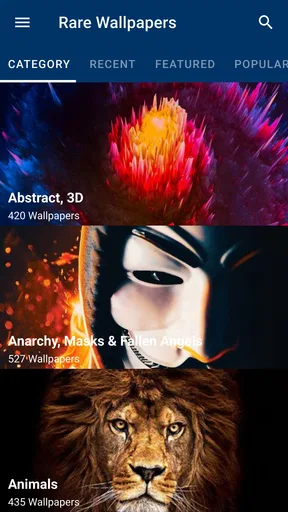
Now, onto the user interface. I'm all about apps that are intuitive and easy to navigate, and this one definitely ticks that box. From the moment you open it, everything feels smooth and responsive. The categories are well-organized, making it a breeze to find what you’re looking for. Plus, there’s a handy search feature if you’ve got something specific in mind. I found myself getting lost in the app for way longer than I’d care to admit, simply because browsing through the beautiful images is just so damn enjoyable.
Search is most helpful when you have a clear subject or look in mind; categories are a better starting point when you are browsing with someone else and want to compare broad styles. In a shared-use situation, I would let each person name one preference, then search or browse for images that overlap. That small constraint keeps the process from becoming a long scroll where one user’s taste dominates simply because they are holding the device.
One trade-off with an image-first browsing experience is that visual appeal can outrun practicality. I try to judge a candidate at the size and layout where it will actually be used, not only as a large preview. If the wallpaper makes icons, labels, or the clock harder to pick out, it may be a poor everyday choice even if the image itself is beautiful. Readability is part of a successful personalization, especially on a device used by more than one person.
Customization Options
One of the standout features for me was the customization options. You can set wallpapers as your lock screen, home screen, or both with just a few taps. I mean, who doesn’t love a little customization in their life? Plus, the app regularly updates its collection, so you’ll always have fresh content to choose from. It’s like having a new phone every time you change your wallpaper.
Setting the same image on both screens is the simplest choice, but it is not always the most useful one. A detailed picture can look attractive on the lock screen and become visually noisy behind a grid of icons. If the device allows separate choices through the wallpaper-setting flow, I would consider pairing a more detailed lock-screen image with a quieter home-screen background. That gives the phone a personal touch while keeping the screen people use most often easier to scan.
For a realistic everyday example, imagine a family tablet that is passed around after school. A parent can browse a few landscape or abstract options, check which one leaves the home-screen icons clear, and set it as the background before the evening routine begins. The point is not to refresh the screen every day; it is to make one considered choice that remains pleasant for everyone using it. When the household’s preference changes, the same browsing process makes switching straightforward.
Performance
In terms of performance, the app runs like a dream. It’s lightweight, so it doesn't hog your phone’s resources, and I didn’t experience any lag or crashes during my time with it. Even the download times for the high-resolution images were impressively fast. It’s clear that the developers have put a lot of effort into optimizing the app's performance, which I really appreciate.
My practical advice is to be selective about what you keep on the device. A large collection is enjoyable to browse, but saving images you will never use can make it harder to find the few you liked. I would choose a small shortlist, compare those on the actual screen, and remove the candidates that do not fit. This is less about managing a technical problem and more about making the final decision easier.
If you mainly want a wallpaper once and then rarely change it, a dedicated browsing app may be more than you need after that first choice. The built-in gallery or system picker can be enough for someone who already has a suitable photo. On the other hand, if you like changing the appearance with the seasons or want to explore styles beyond your own camera roll, having a broad collection in one place is the more appealing option.
Community and Sharing
Another cool aspect is the community feature. You can upload your own creations and share them with other users. It’s a great way to showcase your creativity and maybe even get inspired by others. And if you find a wallpaper you love, sharing it with friends is just a tap away. Who knew a simple wallpaper app could be such a social experience?
For household use, sharing works best as inspiration rather than as a substitute for a conversation about the device. A person can show another user an image they like, then discuss whether it suits the shared screen. If a wallpaper is uploaded or shared, remember that other people may see or reuse it; I would avoid treating a personal family image as a casual public-facing design unless everyone pictured is comfortable with that choice.
The app is rated for Everyone, which makes its general audience broad, but that does not mean every image or sharing decision is automatically right for every child or family. I would browse together with younger users and agree on what is appropriate to display. That is ordinary device guidance, not a special control in the app. Adults who want separate tastes and boundaries may find a personal device more suitable than trying to make one shared screen satisfy everyone.
Who will enjoy it, and who may prefer another route
I think this app makes most sense for someone who enjoys browsing for visual ideas and wants a quick way to refresh a phone’s appearance. It also suits households that can agree on a shared background, or people who want to show a friend a range of options before settling on one. The search and category browsing are useful when you have a theme in mind, while the wide choice is enjoyable when you are open to being surprised.
I would skip it if you are already happy with your own photos, dislike browsing through large image collections, or want a wallpaper tool built around extensive editing rather than selecting and applying images. It is also not the right solution for managing separate users, setting household rules, or protecting personal content; a wallpaper app changes the screen’s look, not the boundaries of a shared device. In those cases, a gallery, a system-level option, or a more suitable device arrangement will serve the real need better.
The app is free, though in-app purchases are available at prices ranging from $0.99 to $99.99 per item. I would begin with the free experience and decide whether it already meets your needs before considering any purchase. That is especially sensible for a shared device, where several people may like browsing but only need one agreed background. The free starting point makes it easy to judge the collection for yourself without turning a simple design choice into a commitment.
It was released on October 25, 2019, and the current version is 3.17.6. It requires Android 6.0 or later, so it is aimed at Android devices that meet that minimum. If you are choosing it for a household phone or tablet, check the operating system before expecting to install it. Once it is on a compatible device, the basic decision remains personal: whether its selection and simple wallpaper-setting workflow are more useful to you than choosing from your own images or the system’s built-in options.
Overall, Wallpapers HD - Backgrounds 4K is a fantastic app that offers an incredible range of wallpapers in stunning quality. It’s perfect for anyone looking to spruce up their device with a fresh new look. The app is well-designed, easy to use, and performs beautifully. If you haven't checked it out yet, I highly recommend giving it a try. Your phone deserves to look good, after all!
My household verdict is positive, with one clear qualification: I would recommend it for discovering and applying a shared background, not for solving shared-device management. Its large selection, straightforward browsing, and choice of screen placement make it an approachable personalization app; thoughtful cropping, legibility, and agreement between users make the result work in daily life. If you want a quick visual refresh and enjoy choosing images, it is worth trying. If you need separate user spaces or prefer to use only your own photos, another approach will fit better.
Verdict
Strengths of Wallpapers HD - Backgrounds 4K
- Wide selection of high-quality images.
- User-friendly interface with easy navigation.
- Regular updates with new wallpapers.
- Customizable categories and themes.
- Supports 4K and Retina displays.
Limitations of Wallpapers HD - Backgrounds 4K
- Contains ads that can be intrusive.
- Limited offline functionality.
- Requires internet for updates.
- Some wallpapers may repeat in categories.
- Premium features locked behind paywall.
Other Releases by TarrySoft
View All
Pixel 4D™ Live Wallpapers
Personalization4.7

Photo Collage Maker & Editor
Photography4.7

Video Compressor & Converter
Video Players & Editors4.5

Cleaner - Clean Phone & VPN
Tools4.6
Similar Picks in This Category
View All
Microsoft SwiftKey AI Keyboard
SwiftKey4.3

Wallpapers
Google LLC4.1

Zedge™ Wallpapers & Ringtones
Zedge4.7

Yandex Browser with Alice AI
Direct Cursus Computer Systems Trading LLC4.3

Ringtone Maker:create ringtone
Big Bang Inc.4.7

Fonts Keyboard
Fonts Keyboard3.9
Frequently Asked Questions
What features does Wallpapers HD - Backgrounds 4K offer?
Wallpapers HD - Backgrounds 4K provides an extensive collection of high-resolution wallpapers, including 4K and Full HD images. The app features categories such as nature, abstract, animals, and more. It also supports automatic wallpaper updates, allowing users to have fresh backgrounds daily without manually changing them.
Is Wallpapers HD - Backgrounds 4K free to use?
Yes, Wallpapers HD - Backgrounds 4K is free to download and use. While the app provides a wide range of free wallpapers, it may offer in-app purchases or ads for additional premium content and an ad-free experience. These purchases are optional and not necessary to enjoy the app.
How can I set a wallpaper from Wallpapers HD - Backgrounds 4K?
Setting a wallpaper is simple. Browse through the categories or search for a specific image. Once you find a wallpaper you like, tap on it and select the option to set it as your home screen or lock screen wallpaper. The app provides easy navigation and clear instructions for customization.
Does Wallpapers HD - Backgrounds 4K affect battery life?
Using Wallpapers HD - Backgrounds 4K may have a minimal impact on battery life, especially if you use dynamic wallpapers or frequent updates. However, static wallpapers generally have negligible effects. The app is optimized to ensure that it does not significantly drain your device’s battery.
Can I use Wallpapers HD - Backgrounds 4K offline?
While the app requires an internet connection to download new wallpapers, once downloaded, you can set and use these wallpapers offline. It’s advisable to download your favorite wallpapers while connected to Wi-Fi to ensure you have access to them without using mobile data.
